
Command Palette
Search for a command to run...
Search for a command to run...
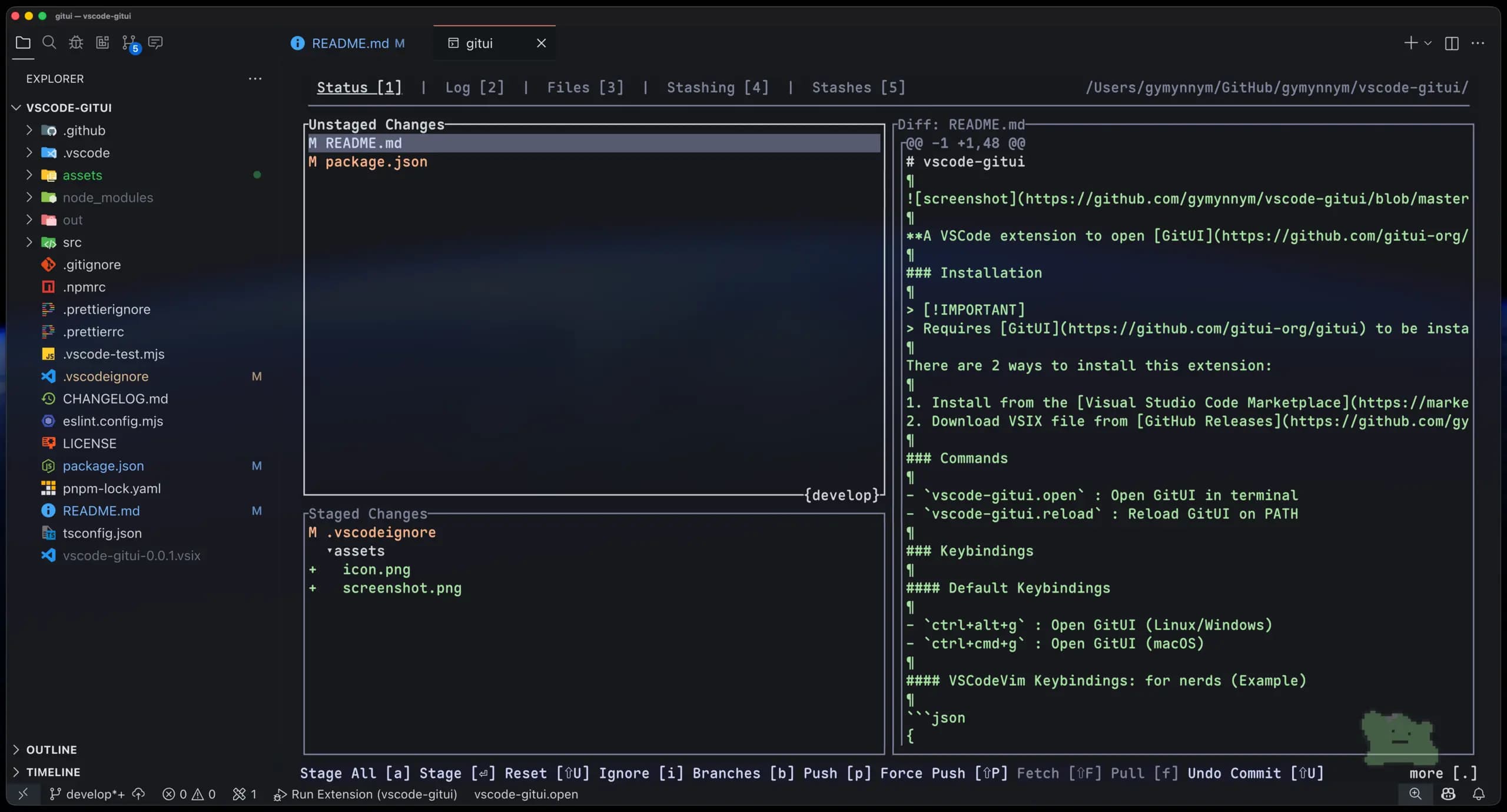
GitUI, Lazygit은 터미널(TUI: Terminal User Interface) 상에서 동작하는 Git 클라이언트입니다. GUI 기반 Git 클라이언트보다 가볍고 빠르게 동작하며, 키보드 중심의 조작에 최적화되어 있습니다.
VSCode에서도 터미널을 열어 GitUI나 Lazygit을 실행할 수 있지만, 실행할 때마다 터미널을 열고 명령어를 입력하며 패널을 전환하는 작업은 번거로웠습니다. 그래서 GitUI/Lazygit을 에디터 패널 안에서 즉시 열 수 있도록 하는 VSCode 확장 기능(vscode-gitui) 을 만들어 보았습니다.
https://github.com/gymynnym/vscode-gitui
사용해보고 싶으신 분은 VSCode Marketplace나GitHub Releases에서 설치하실 수 있습니다.
VSCodeVim 사용자용 키바인딩도 제공합니다. 자세한 내용은 리포지토리의 README를 참고해주세요.
VSCode: Your First Extension을 참고했습니다.
먼저 다음 명령어로 프로젝트를 생성합니다.
$ npx --package yo --package generator-code -- yo code
확장 기능 개발 언어로 TypeScript를 선택했습니다.
그 다음 패키지화을 위해 vsce를 설치합니다.
$ pnpm add -D @vscode/vsce
// package.json
{
  "scripts": {
    "package": "vsce package"
  }
}
이 확장 기능에서는 다음 두 가지 커맨드를 등록합니다.
vscode-gitui.open : GitUI/Lazygit을 에디터 패널에서 여는 커맨드vscode-gitui.reload : GitUI/Lazygit을 PATH에서 리로드하는 커맨드// src/extension.ts
export function activate(context: vscode.ExtensionContext) {
const disposables = [
vscode.commands.registerCommand('vscode-gitui.open', () => handleGitClientCommand(openGitClient)),
vscode.commands.registerCommand('vscode-gitui.reload', () => handleGitClientCommand(reloadGitClient)),
...
];
disposables.forEach((disposable) => context.subscriptions.push(disposable));
}
handleGitClientCommand는 GitUI/Lazygit 명령어가 PATH에 존재하는지 확인하는 유틸리티 함수입니다. 자세한 내용은 extension.ts을 참고해주세요.
vscode-gitui.open// src/commands/open.ts
async function openGitClient() {
const workspace = await getCurrentWorkspace();
const command = resolveGitCommand();
if (workspace) {
runCommandInTerminal(command, {
name: command,
cwd: workspace,
location: vscode.TerminalLocation.Editor,
});
}
}
async function getCurrentWorkspace(): Promise<string | undefined> {
const workspaceFolders = vscode.workspace.workspaceFolders;
if (!workspaceFolders || workspaceFolders.length === 0) {
throw new Error(ErrorMessage.WORKSPACE_NOT_FOUND);
}
if (workspaceFolders.length === 1) {
return workspaceFolders[0].uri.fsPath;
}
const pickedWorkspace = await vscode.window.showWorkspaceFolderPick({
placeHolder: 'Select a workspace folder to open gitui in',
ignoreFocusOut: true,
});
return pickedWorkspace?.uri.fsPath;
}
export { openGitClient };
openGitClient 함수는 현재 워크스페이스를 확인한 뒤, GitUI/Lazygit 명령어를 에디터 패널에서 실행합니다.
getCurrentWorkspace 함수는 현재 워크스페이스를 확인한 뒤, GitUI/Lazygit 명령어를 에디터 패널에서 실행합니다.
vscode-gitui.reload// src/commands/reload.ts
async function reloadGitClient() {
const command = resolveGitCommand();
const exists = await checkCommandExists(command);
if (exists) {
vscode.window.showInformationMessage(InfoMessage.COMMAND_FOUND(command));
} else {
vscode.window.showErrorMessage(ErrorMessage.COMMAND_NOT_FOUND(command));
}
}
reloadGitClient 함수는 GitUI/Lazygit 명령어가 PATH에 존재하는지 검사하고, 그 결과를 메시지로 표시합니다.
checkCommandExists 함수는 명령어 존재 여부를 체크하는 유틸리티 함수입니다.

사실 처음에는 GitUI만 지원할 예정이었습니다. 그런데 한 사용자가 Lazygit 지원 관련하여 이슈를 발행해주었고, 이를 계기로 Lazygit도 함께 지원하게 되었습니다.
위 코드에서 사용하는 resolveGitCommand 함수는 사용자 설정에 따라 GitUI 또는 Lazygit을 선택하도록 변경했습니다.
먼저 package.json의 properties에 Lazygit 사용 여부 설정 항목을 추가합니다.
// package.json
{
  "contributes": {
    "configuration": {
      "title": "vscode-gitui",
      "properties": {
        ...
        "vscode-gitui.useLazygit": {
          "type": "boolean",
          "default": false,
          "description": "Enable if you want to use Lazygit instead of GitUI."
        }
      }
    },
  }
}
그리고 resolveGitCommand를 다음과 같이 구현해 Git 클라이언트를 결정하도록 했습니다.
// src/lib/command.ts
const GITUI_COMMAND = 'gitui';
const LAZYGIT_COMMAND = 'lazygit';

function resolveGitCommand(): string {
  const useLazygit = vscode.workspace.getConfiguration('vscode-gitui').get<boolean>('useLazygit', false);
  return useLazygit ? LAZYGIT_COMMAND : GITUI_COMMAND;
}
VSCode에서 GitUI/Lazygit을 사용할 수 있는 확장 기능을 만들어 보았습니다. 첫 VSCode 확장 기능 개발이었지만 비교적 쉽게 구현할 수 있었습니다. 개발 과정에서 GitHub Issue를 통해 사용자와 직접 소통할 수 있었던 점도 좋은 경험이었습니다. 여러분도 자신의 필요에 맞춘 VSCode 확장 기능을 만들어보는 것을 추천합니다!
로그인 후 댓글을 작성할 수 있습니다.