
Command Palette
Search for a command to run...
Search for a command to run...
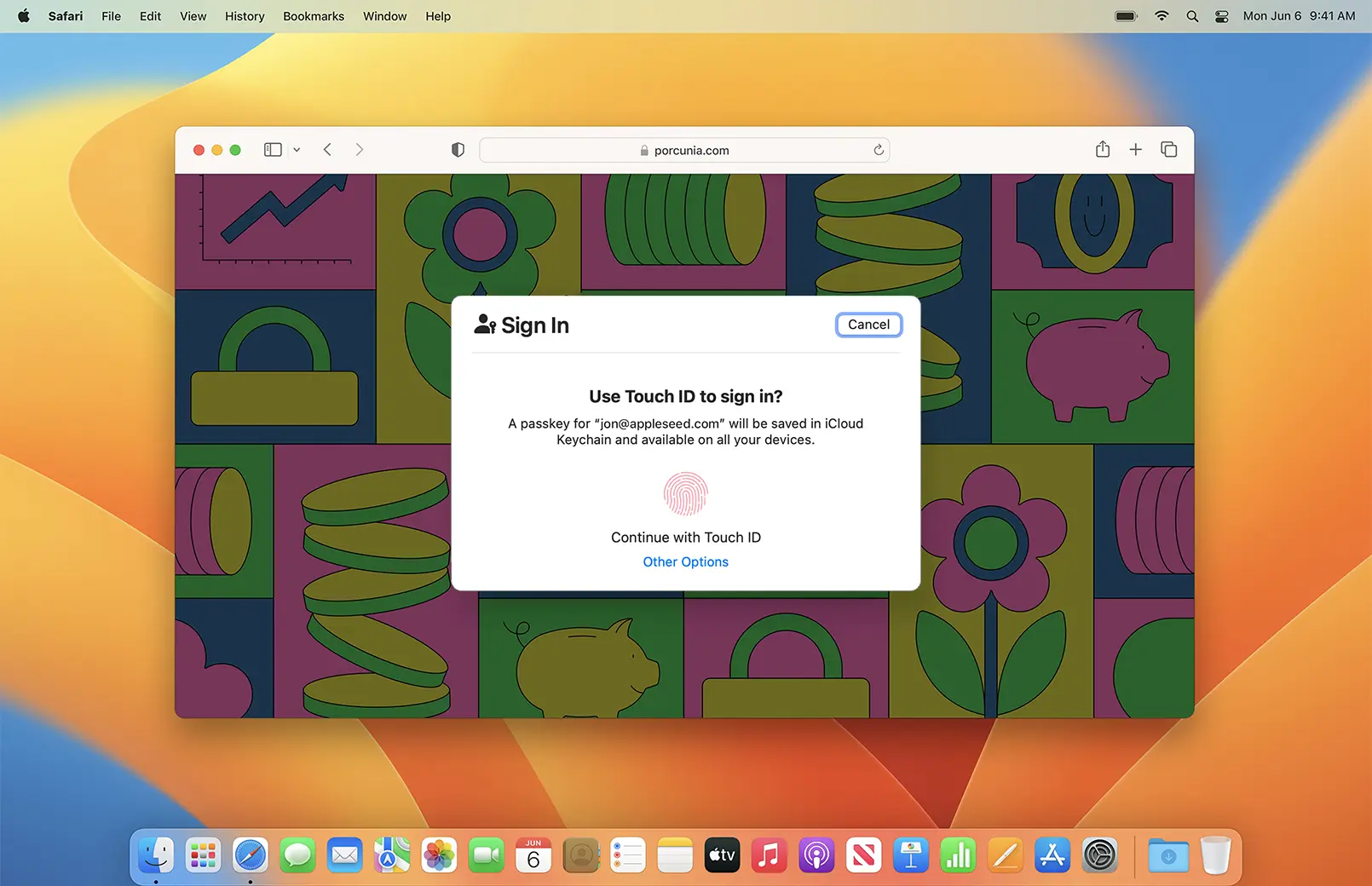
최근 저는 웹서비스에서 인증할 때, Passkey로 로그인 버튼이 있는 경우, 입에 미소를 띄며 바로 클릭하는 경우가 많아졌습니다. Passkey를 사용한 인증 방식이 더 안전하고 간편하기 때문입니다. 따라서 Passkey로 로그인 버튼이 무엇인지에 대해 설명하겠습니다.
W3C(World Wide Web Consortium)는 World Wide Web을 위한 국제 표준화 기구입니다.
FIDO2 프로젝트는 웹을 위한 강력한 인증을 만들기 위해 FIDO Alliance와 W3C이 공동으로 추진하는 프로젝트입니다.
WebAuthn이란 W3C에서 지정한 웹 표준으로, FIDO2 프로젝트의 핵심 구성 요소입니다. 개발자라면 ssh에서 사용하는 공개키 인증 방식과 비슷하다고 봐도 좋습니다. WebAuthn은 비밀번호 대신 공개키/비밀키 쌍을 사용하며, 사용자는 본인의 비밀(비밀번호 또는 개인키)을 서버로 전송하지 않습니다.
WebAuthn은 다음과 같은 3가지 구성요소를 포함합니다:
WebAuthn은 웹사이트가 WebAuthn Credentials(자격증명)로 사용자를 인증하기 위한 API를 정의하고, WebAuthn 인증기가 수행해야 할 동작을 규정합니다.
"Passkey 설명한다면서, WebAuthn이 왜 나와?" 라고 생각하고 계신다면, 바로 다다음 절에서 설명하니 이동해서 보셔도 좋습니다.
WebAuthn 인증기는 신뢰 가능한 인증 정보 관리기입니다. WebAuthn은 사용자의 개인키를 안전하게 보관하고, 서버가 보낸 챌린지에 서명하는 역할을 합니다. 또한 인증기는 여러 종류가 있으며 다음과 같이 나눌 수 있습니다:
TPM(Trusted Platform Module) 이란 보안 전용 칩셋으로, 일반적인 소프트웨어 공격으로는 내부에 저장된 정보를 탈취하기 어렵게 설계되었습니다.
Passkey란 어떤 WebAuthn 인증기에 의해 관리되는 WebAuthn 자격증명을 가리키는 비기술적 용어입니다. 구글, 깃허브 등 다양한 서비스의 인증 시스템에서 사용자에게 WebAuthn 자격증명을 Passkey라고 표현합니다.
일반 사용자 입장에서 "WebAuthn(Web Authentication) 자격증명으로 로그인" 버튼은 너무 기술적으로 보여 클릭하기 싫을 것 같습니다.
WebAuthn 동작 흐름은 크게 Registration(등록) 과 Authentication(인증) 두 단계로 나뉘며, 이 흐름은 일반적인 서비스의 가입/로그인과 비슷합니다. 단, 이 과정에서 서버는 사용자의 비밀(개인키, 비밀번호)을 절대 알 수 없으며, 각 키의 사용처는 다음과 같습니다:
challenge : 서명 및 검증 시, 사용할 무작위 데이터rp : Relying Party 정보 (id 속성으로 유효한 도메인 범위 지정)user : 현재 등록하려는 사용자의 정보pubKeyCredParams : 추천 암호화 알고리즘navigator.credentials.create() 호출navigator.credentials.get() 호출WebAuthn 기반 인증 시스템을 Go + Gin 프로젝트로 구현해보겠습니다. WebAuthn 동작 흐름의 각 절차가 주석과 함께 등장합니다!
gymynnym/learn-webauthn 저장소에서 전체 코드를 확인하실 수 있습니다.
$ mkdir learn-webauthn && cd learn-webauthn/
$ go mod init learn-webauthn
$ go get -u github.com/gin-gonic/gin
$ go get -u github.com/go-webauthn/webauthn/webauthn
// model.go
package main

type RegistrationCache struct {
	SessionData webauthn.SessionData
	PendingUser *User
}
RegistrationCache는 Registration(등록)에 사용할 임시 저장소 구조입니다.
SessionData는 등록 인증 시 사용PendingUser는 인증에 성공하면 저장할 사용자 객체// main.go
package main
import (
"github.com/gin-gonic/gin"
"github.com/go-webauthn/webauthn/webauthn"
)
const ( // Gin 서버 설정
HOSTNAME = "localhost"
PORT = ":8080"
)
var (
userDB = map[string]*User{} // in-memory DB (username -> User)
registerationCacheStore = map[string]*RegistrationCache{} // in-memory registration 임시 저장소 (uesrname -> RegistrationCache)
loginSessionStore = map[string]*webauthn.SessionData{} // in-memory login 임시 저장소(username -> SessionData)
webAuthn *webauthn.WebAuthn
)
func initWebAuthn() { // WebAuthn 객체 초기화
var err error
webAuthn, err = webauthn.New(&webauthn.Config{
// Relying Party 설정
RPDisplayName: "Example App",
RPID: HOSTNAME,
RPOrigins: []string{"http://" + HOSTNAME + PORT},
})
if err != nil {
panic("Failed to initialize WebAuthn: " + err.Error())
}
}
func main() {
initWebAuthn()
r := gin.Default()
if err := r.Run(PORT); err != nil {
panic("Failed to start server: " + err.Error())
}
}
userDB : User용 인-메모리 DBregistrationCacheStore : 등록(Registration)에서 사용될 임시 저장소loginSessionStore : 인증(Authentication)에서 사용될 임시 저장소webAuthn : WebAuthn 객체main.r : Gin 객체, 라우터 역할User 모델을 WebAuthn과 함께 사용하려면 webauthn.User 인터페이스를 구현해줘야 합니다.
// webauthn/types.go
type User interface {
	WebAuthnID() []byte                // 사용자 고유 식별자 (최대 64바이트)
	WebAuthnName() string              // 사용자 계정명
	WebAuthnDisplayName() string       // 사용자 표시명 (for-human readable)
	WebAuthnCredentials() []Credential // 자격증명 목록
}
WebAuthnID는 보통 DB에 저장된 사용자 ID를 그대로 사용합니다. DB에 저장된 사용자 ID는 정수형일 수도 UUID 형태일 수도 있으며, 다양한 ID 자료형에 대응하기 위해 byte형입니다.
// model.go
package main

import (
	"encoding/binary"

	"github.com/go-webauthn/webauthn/webauthn"
)

type User struct {
	ID          uint64
	Name        string
	Credentials webauthn.Credentials
}

func (u *User) WebAuthnID() []byte {
	b := make([]byte, 8)
	binary.LittleEndian.PutUint64(b, u.ID)
	return b
}
func (u *User) WebAuthnName() string                       { return u.Name }
func (u *User) WebAuthnDisplayName() string                { return u.Name }
func (u *User) WebAuthnCredentials() []webauthn.Credential { return u.Credentials }
func beginRegistration(c *gin.Context) {
	username := c.Param("username")

	// user 존재 여부 확인
	if _, exists := userDB[username]; exists {
		c.JSON(409, gin.H{"error": "User already exists"})
		return
	}

	// 사용자 객체 생성
	user := User{
		ID:   uint64(len(userDB) + 1),
		Name: username,
	}

	// 등록#2: 챌린지 및 옵션 생성
	options, sessionData, err := webAuthn.BeginRegistration(&user)
	if err != nil {
		c.JSON(500, gin.H{"error": "Failed to begin registration"})
		return
	}

	// 임시 저장소에 세션 데이터 및 사용자 정보 저장
	registerationCacheStore[username] = &RegistrationCache{
		SessionData: *sessionData,
		PendingUser: &user,
	}
	c.JSON(200, options)
}

func finishRegistration(c *gin.Context) {
	username := c.Param("username")

	// 세션 데이터 및 사용자 정보 가져오기
	cache, exists := registerationCacheStore[username]
	if !exists {
		c.JSON(400, gin.H{"error": "No session data found"})
		return
	}

	// 등록#6: 검증
	credential, err := webAuthn.FinishRegistration(cache.PendingUser, cache.SessionData, c.Request)
	if err != nil {
		c.JSON(400, gin.H{"error": "Failed to finish registration"})
		return
	}

	// 등록#6: 저장
	user := cache.PendingUser
	user.Credentials = append(user.Credentials, *credential) // 새로운 자격 증명 추가
	userDB[username] = user                                  // 사용자 DB에 저장
	delete(registerationCacheStore, username)                // 임시 저장소 정리

	c.JSON(200, gin.H{"status": "Registration successful"})
}
func main() {
	// ...
	r.GET("/register/begin/:username", beginRegistration)
	r.POST("/register/finish/:username", finishRegistration)
	// ...
}
GET /register/begin/:username 엔드포인트는 등록(Registration)을 시작하기 위한 API로, 다음과 같은 역할을 수행합니다:
username으로 DB에서 존재 여부 확인User 객체 생성user 객체에 대한 챌린지와 옵션을 생성하고 클라이언트에 반환
SessionData와 User 객체 저장POST /register/finish/:username 엔드포인트는 등록(Registration)을 마치기 위한 API로, 다음과 같은 역할을 수행합니다:
username으로 임시 저장소의 캐시 존재 여부 확인User 객체 가져와서 Credential과 함께 DB에 저장func beginLogin(c *gin.Context) {
username := c.Param("username")
// user 가져오기 및 존재 여부 확인
user, exists := userDB[username]
if !exists {
c.JSON(404, gin.H{"error": "User not found"})
return
}
// 인증#2: 챌린지 생성
options, sessionData, err := webAuthn.BeginLogin(user)
if err != nil {
c.JSON(500, gin.H{"error": "Failed to begin login"})
return
}
loginSessionStore[username] = sessionData
c.JSON(200, options)
}
func finishLogin(c *gin.Context) {
username := c.Param("username")
// user 가져오기 및 존재 여부 확인
user, exists := userDB[username]
if !exists {
c.JSON(404, gin.H{"error": "User not found"})
return
}
// 임시 저장소에서 세션 데이터 가져오기
sessionData, exists := loginSessionStore[username]
if !exists {
c.JSON(400, gin.H{"error": "No session data found"})
return
}
// #인증#6: 검증
credential, err := webAuthn.FinishLogin(user, *sessionData, c.Request)
if err != nil {
c.JSON(400, gin.H{"error": "Failed to finish login"})
return
}
_ = credential // TODO: Credential을 활용한 세션 또는 토큰 발급
delete(loginSessionStore, username) // 임시 저장소 정리
c.JSON(200, gin.H{"status": "Login successful"})
}
func main() {
	// ...
	r.GET("/login/begin/:username", beginLogin)
	r.POST("/login/finish/:username", finishLogin)
	// ...
}
GET /login/begin/:username 엔드포인트는 인증(Authentication)을 시작하기 위한 API로, 다음과 같은 역할을 수행합니다:
username으로 DB에서 존재 여부 확인SessionData 객체 저장POST /login/finish/:username 엔드포인트는 인증(Authentication)을 마치기 위한 API로, 다음과 같은 역할을 수행합니다:
username으로 DB에서 존재 여부 확인SessionData 가져오기<div>
<h1>Passkey Demo (Go + Gin)</h1>
</div>
<div>
<label>Username: <input type="text" id="username" value="foo"></label>
<br/>
<button onclick="register()">Passkey 등록</button>
<button onclick="login()">Passkey로 로그인</button>
</div>
<div id="logs" />
// Log 유틸리티
const logEl = document.getElementById('logs');
function log(msg) {
	logEl.innerText = `${logEl.innerText}\n${msg}`;
}

// Base64 URL-safe 인코딩/디코딩 유틸리티
function bufferDecode(value) {
	return Uint8Array.from(atob(value.replace(/-/g, "+")
		.replace(/_/g, "/")), c => c.charCodeAt(0));
}
function bufferEncode(value) {
	return btoa(String.fromCharCode.apply(null, new Uint8Array(value)))
		.replace(/\+/g, "-").replace(/\//g, "_").replace(/=/g, "");
}

async function register() {
	const username = document.getElementById('username').value;

	try {
		// 등록#1: 등록 요청
		const beginRes = await fetch(`/register/begin/${username}`);
		const options = await beginRes.json();

		// 등록#3: 인증기 호출
		log("[Register] call authenticator");
		options.publicKey.challenge = bufferDecode(options.publicKey.challenge);
		options.publicKey.user.id = bufferDecode(options.publicKey.user.id);
		const credential = await navigator.credentials.create({ publicKey: options.publicKey });

		// 등록#5: 서명 결과 전달
		const credentialJSON = {
			id: credential.id,
			rawId: bufferEncode(credential.rawId),
			type: credential.type,
			response: {
				attestationObject: bufferEncode(credential.response.attestationObject),
				clientDataJSON: bufferEncode(credential.response.clientDataJSON),
			},
		};
		const finishRes = await fetch(`/register/finish/${username}`, {
			method: 'POST',
			headers: { 'Content-Type': 'application/json' },
			body: JSON.stringify(credentialJSON)
		});

		const finishJSON = await finishRes.json();
		log("[Register] finished: " + JSON.stringify(finishJSON));
	} catch (e) {
		log("Error: " + e);
		console.error(e);
	}
}

async function login() {
	const username = document.getElementById('username').value;
	try {
		// 인증#1: 로그인 요청
		const beginRes = await fetch(`/login/begin/${username}`);
		const options = await beginRes.json();

		// 인증#3: 인증기 호출
		log("[Login] call authenticator");
		options.publicKey.challenge = bufferDecode(options.publicKey.challenge);
		options.publicKey.allowCredentials.forEach(c => {
			c.id = bufferDecode(c.id);
		});
		const assertion = await navigator.credentials.get({ publicKey: options.publicKey });

		// 인증#5: 서명 결과 전달
		const assertionJSON = {
			id: assertion.id,
			rawId: bufferEncode(assertion.rawId),
			type: assertion.type,
			response: {
				authenticatorData: bufferEncode(assertion.response.authenticatorData),
				clientDataJSON: bufferEncode(assertion.response.clientDataJSON),
				signature: bufferEncode(assertion.response.signature),
				userHandle: assertion.response.userHandle ? bufferEncode(assertion.response.userHandle) : null,
			},
		};
		const finishRes = await fetch(`/login/finish/${username}`, {
			method: 'POST',
			headers: { 'Content-Type': 'application/json' },
			body: JSON.stringify(assertionJSON)
		});

		const finishJSON = await finishRes.json();
		log("[Login] finished: " + JSON.stringify(finishJSON));
	} catch (e) {
		log("Error: " + e);
		console.error(e);
	}
}
register 함수는 "Passkey 등록" 버튼을 누르면 실행되며, 다음과 같은 역할을 수행합니다:
input#username의 값 가져오기PublicKeyCredentialCreationOptions 객체 수신login 함수는 "Passkey로 로그인" 버튼을 누르면 실행되며, 다음과 같은 역할을 수행합니다:
input#username의 값 가져오기PublicKeyCredentialRequestOptions 객체 수신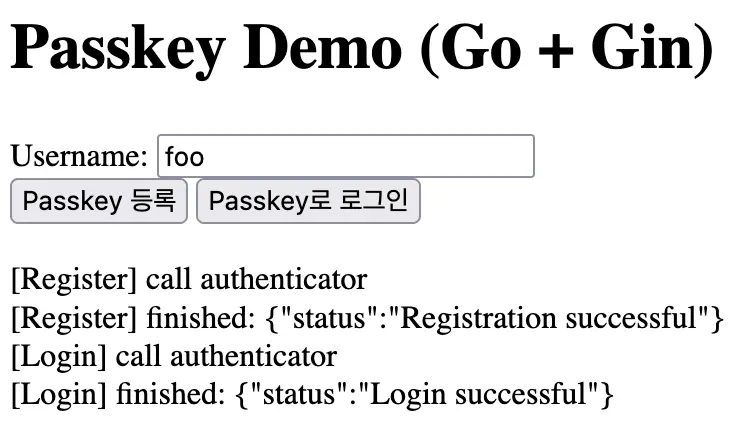
WebAuthn API navigator.credentials는 https가 필수지만, 예외적으로 로컬 개발 환경에서는 허용됩니다!
WebAuthn(Passkey) 를 통한 인증 방식은 사용자 개인이 비밀을 관리하며, 서버에는 저장하지 않습니다. 따라서 만에 하나 서버가 해킹되어도 사용자의 비밀은 유출되지 않은 섹시한 인증 방법론이지만, 모든 사용자가 WebAuthn을 위한 준비물을 가지고 있지는 않습니다. 예를 들어 패스워드 매니저를 사용하지 않거나, 하드웨어에 따라 TPM 모듈이 없는 경우도 있습니다. 때문에 WebAuthn 인증을 지원하는 서비스도 보조 인증 수단으로 사용할 뿐, WebAuthn-only(password-less)인 경우는 잘 없습니다. 사용자 설정에 "Passkey로 우선 로그인" 체크박스가 추가되는 등의 움직임은 보이지만, 아직은 과도기인 것 같습니다. 어쩌면 비밀번호 로그인은 너무 간편해서 사라지지 않을 지도 모릅니다. :(
로그인 후 댓글을 작성할 수 있습니다.